
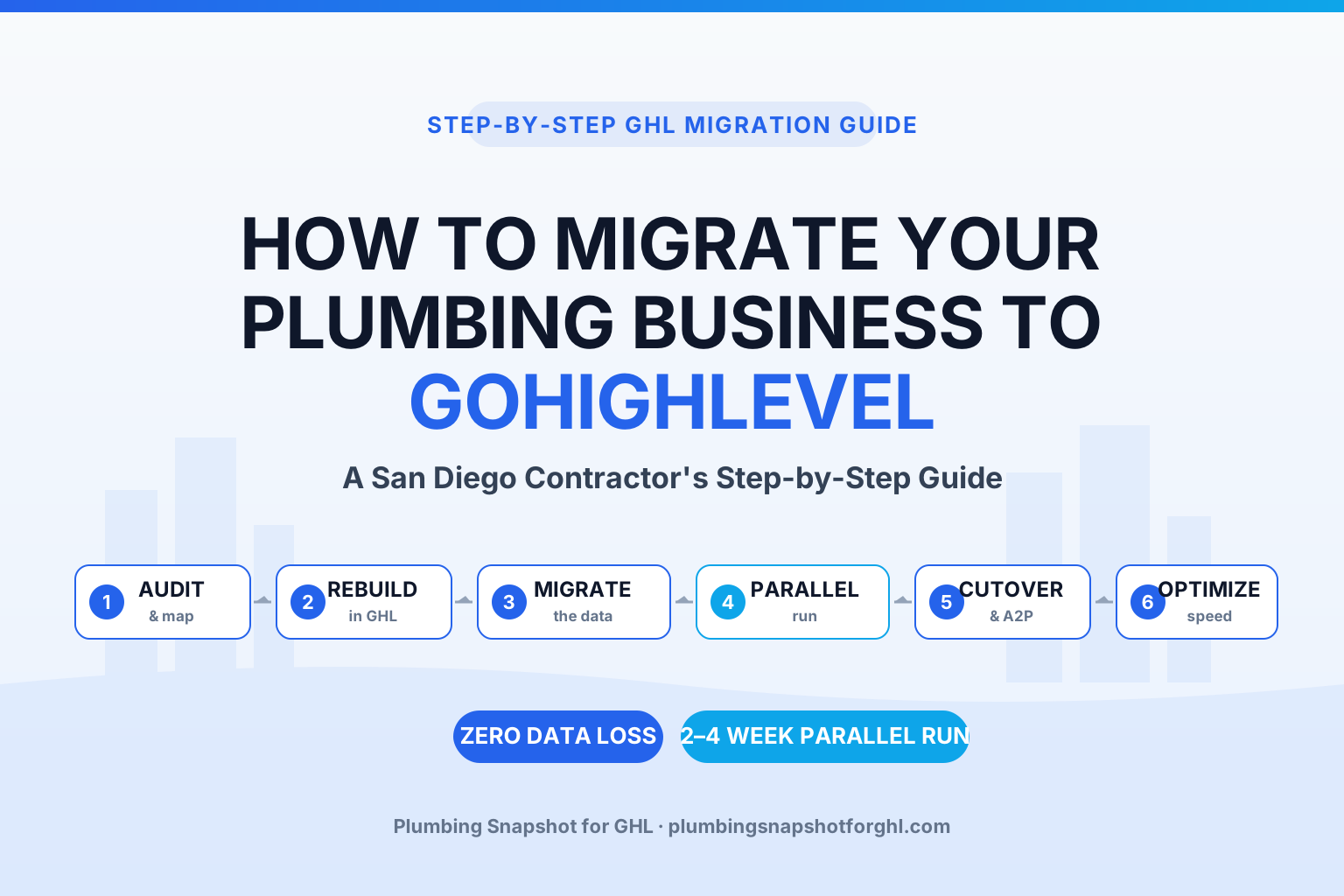
To migrate a San Diego plumbing business to GoHighLevel, you follow six steps: audit and map your current system, rebuild your pipelines and workflows inside a GHL sub-account, migrate your data (contacts, job history, calendars, recurring maintenance plans, and automations), run the old and new systems in parallel for a short window, cut over your calls and booking, then verify nothing was lost and tune your speed-to-lead. Done right, the switch costs you zero data and zero missed jobs — because the parallel run catches anything before you flip the switch. This guide walks the whole move the way I’d brief a service manager: plainly, in order, with the numbers attached and the traps flagged.
In this guide
- The short answer: how a San Diego plumber migrates to GoHighLevel
- Why San Diego plumbers are consolidating onto GoHighLevel
- Before you migrate: what a clean migration actually protects
- How to migrate your plumbing business to GoHighLevel in 6 steps
- What migrating to GoHighLevel costs — and what it replaces
- DIY vs done-for-you migration: which should a San Diego shop choose?
- Frequently asked questions
- About the author
- Related reading
The short answer: how a San Diego plumber migrates to GoHighLevel
Migrating to GoHighLevel means moving your plumbing operation — your customer list, job history, pipelines, calendars, recurring maintenance plans, and automations — off whatever you run today (Housecall Pro, Jobber, ServiceTitan, spreadsheets, or a patchwork of apps) and onto one platform that also answers your phones, texts back missed calls, books appointments, and harvests reviews.
The move is not risky when you sequence it correctly. The order that protects your data is: audit and map what you have, rebuild the operation inside a fresh GHL sub-account, migrate the data in, run both systems in parallel so nothing slips, cut over your calls and forms, and verify then optimize. The single most important step is the parallel run — you keep the old system live until the new one has proven it catches every lead and job. That’s how a shop switches platforms without a homeowner ever noticing.
Sources: employment and state ranking — U.S. Bureau of Labor Statistics, Occupational Outlook Handbook and BLS OES 47-2152; lead-response multiplier — Harvard Business Review.
Why San Diego plumbers are consolidating onto GoHighLevel
San Diego is a crowded, high-demand market. California has the highest plumber employment level of any state in the country (BLS OES), and nationally there are roughly 504,500 plumbers, pipefitters, and steamfitters, with about 44,000 openings a year and steady 4% growth through 2034 (U.S. Bureau of Labor Statistics). Translation: a San Diego homeowner with a slab leak in Clairemont or a failing water heater in Chula Vista has a long list of plumbers to call — and no patience for the one whose phone rings out.
The problem most shops hit isn’t a lack of software. It’s too much of it. The average company still runs about 106 separate SaaS apps, down from 130 in 2022 but nowhere near lean (BetterCloud). A typical plumbing shop stacks a field-service tool, a separate email platform, a review-request app, a missed-call texting service, and a website chat widget — none of which talk to each other. Every seam between those tools is a place a lead leaks out.
Average number of SaaS apps used per company, 2022–2025 — the trend is consolidation. Source: BetterCloud, State of SaaSOps.
Consolidating onto GoHighLevel collapses that stack into one system. Instead of five tools handing leads to each other and dropping them in the gaps, one platform captures the call, texts back if you miss it, books the job, chases the estimate, and requests the review. That’s not a nice-to-have in San Diego — it’s how you win the speed race. Firms that respond to an inbound lead within an hour are 7× more likely to qualify it than firms that wait even 60 minutes, and 60× more likely than those that wait a day (Harvard Business Review). Tighten the window further and the effect compounds: contacting a lead within 5 minutes instead of 30 makes you 21× more likely to qualify it (MIT / Oldroyd Lead Response Management study). No owner running trucks across San Diego County hits a 5-minute window by hand. Automation does — but only if it’s all in one system.
Before you migrate: what a clean migration actually protects
Owners hesitate to switch platforms because they’re afraid of losing years of data — customer histories, warranty dates, maintenance-plan renewals, the notes that tell a tech which house has the finicky recirculation pump. That fear is legitimate for a sloppy migration and irrelevant for a careful one. A clean migration protects five things, and you should confirm each is accounted for before a single record moves:
- Contacts — every customer and lead, with phone, email, address, and tags intact.
- Job & service history — past work, invoices, and notes, so a tech shows up informed.
- Recurring revenue — maintenance-plan members and their renewal dates, which are the hardest to rebuild and the most expensive to lose.
- Calendars & pipelines — your booking availability and every open opportunity, mapped to the right GHL stage.
- Automations & templates — the email/SMS sequences and forms you rely on, rebuilt natively in GHL.
The migrations that go wrong are the ones done in a weekend rush — export a CSV, import it, cross your fingers. The ones that go right map every field first and keep the old system running until the new one has proven itself. Nobody should switch platforms on hope. You switch on evidence.
How to migrate your plumbing business to GoHighLevel in 6 steps
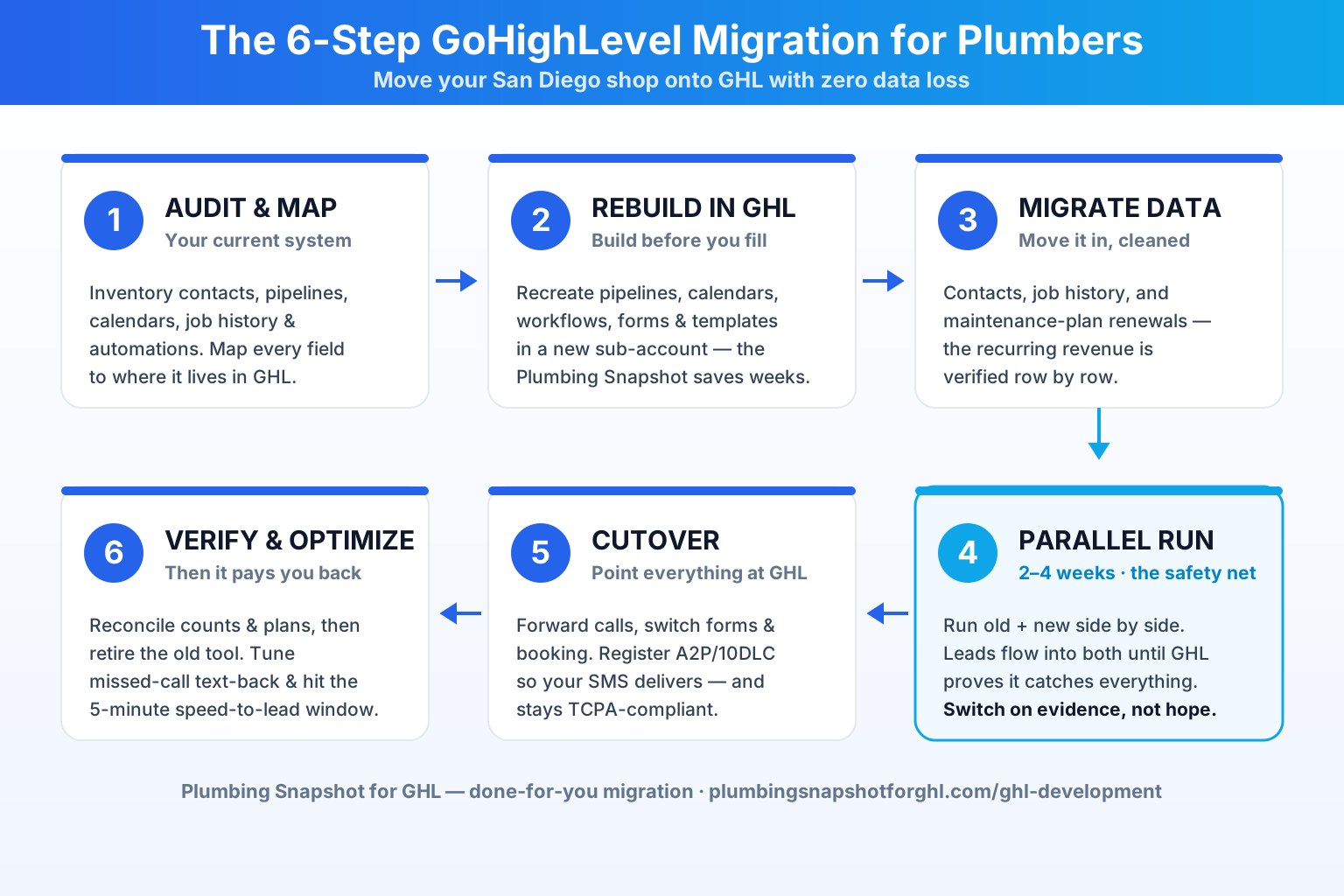
Here is the exact sequence we use to move a plumbing shop onto GoHighLevel without losing data or dropping a single lead in the process.
Step 1: Audit and map your current system
Before anything moves, inventory what you have. Export or list your contacts, pipelines, calendars, job history, active maintenance plans, forms, and every automation currently firing. Then map each field in the old tool to where it will live in GoHighLevel — a customer’s “membership tier” becomes a GHL tag; an open estimate becomes an opportunity in the “Quoted” stage; a service address becomes a custom field. This mapping document is the spine of the whole migration. Skip it and you’ll discover missing data three weeks after cutover, which is the worst time to discover anything.
Step 2: Rebuild your operation inside a GoHighLevel sub-account
Build the destination before you fill it. Stand up a GHL sub-account and recreate the operation: pipelines (New → Quoted → Scheduled → Won), calendars with your real availability, the workflows that answer calls and follow up on leads, your booking forms, and your email/SMS templates. This is where a pre-built Plumbing Snapshot saves weeks — the emergency-dispatch, missed-call text-back, and review-request workflows are already wired for plumbing, so you’re configuring, not building from a blank canvas. If you want the CRM and workflows tailored to how your shop actually runs, this is the step to do it.
Step 3: Migrate your data — contacts, history, and money records
Now move the data into the structure you built. Contacts come in first, cleaned and de-duplicated, with tags applied from your mapping. Then job history, then the records that matter most: active maintenance-plan members and their renewal dates. Recurring revenue is the hardest data to reconstruct and the most costly to lose, so it gets verified row by row. Templates and forms are rebuilt natively rather than force-imported, because a form that half-works is worse than one you rebuilt clean.
Step 4: Run both systems in parallel
This is the step that makes migration safe. For a short window — typically two to four weeks — you run the old system and GoHighLevel side by side. New leads and jobs flow into both. You watch to confirm GHL is capturing every call, booking every appointment, and firing every follow-up correctly. If something’s missing, the old system is still your safety net and you fix the gap before it matters. Nobody flips the switch on faith; you flip it once the new system has proven it catches everything the old one did.
Step 5: Cut over and register your texting (A2P/10DLC)
Once the parallel run is clean, point everything at GoHighLevel: forward your business number so calls and missed-call text-backs run through GHL, switch your website forms and booking to the new calendars, and route your Google Business Profile messages in. Critically, complete A2P/10DLC registration so your automated SMS actually delivers instead of getting filtered by carriers — and make sure your consent and opt-in language is compliant from day one. (Texting homeowners without proper consent is a TCPA problem; see TCPA for plumbers for the specifics.)
Step 6: Verify zero data loss, then optimize speed-to-lead
After cutover, verify: contact counts match, maintenance-plan renewals are all present, open opportunities all landed in the right stage, and every automation fires on a test lead. Only when the numbers reconcile do you decommission the old tool. Then optimize the thing you came for — speed. Tune your missed-call text-back so no ring goes unanswered, tighten follow-up timing to hit that 5-minute window, and turn on review harvesting so completed jobs feed your Google profile. This is when the migration starts paying you back.
What migrating to GoHighLevel costs — and what it replaces
There are two costs to weigh: the ongoing platform cost, and the one-time migration effort.
On the ongoing side, GoHighLevel replaces a stack of separate subscriptions with one platform. Compare that to what field-service tools charge at the top tier: Housecall Pro Max runs $329/month and Jobber Grow runs $199/month (Capterra pricing, Jobber pricing) — and neither of those includes a full email marketing platform, a review-harvesting tool, a missed-call texting service, or a website chatbot. ServiceTitan doesn’t publish pricing publicly; third-party analyses report it in the $245–$500 per technician, per month range plus implementation fees, which is why larger shops feel locked in. Stack the point tools a typical shop bolts on and the real monthly number climbs fast.
Top published monthly price by platform (2026). GoHighLevel’s Starter plan is $97/mo and folds CRM, calendars, email/SMS, missed-call text-back, and review requests into one system; the field-service tools above bill separately for several of those. Sources: Housecall Pro (Capterra), Jobber (Capterra), and published GoHighLevel plans.
On the one-time side, a professional migration is scoped and fixed-price. On our GHL development service, a full platform migration typically runs 2–4 weeks depending on data volume, with fixed-price integration work starting around $3K, and an hourly retainer option at $75/hr if you’d rather go pay-as-you-go. Every project is scoped up front with milestones and a fixed number — no moving targets. If your migration also needs custom software beyond GHL (a job-tracking dashboard, a customer portal, a niche integration), that lives on our custom software side.
DIY vs done-for-you migration: which should a San Diego shop choose?
You can migrate to GoHighLevel yourself. Whether you should depends on two things: how much data you’re moving, and how much a lost week of leads costs you.
DIY makes sense if you’re a solo operator with a short contact list, no complex maintenance-plan data, and time to learn GHL’s builder. Export, clean, import, rebuild your workflows, and take the parallel run slow. The trade is your hours — the evenings spent mapping fields and debugging automations are hours not spent on the trucks or with family.
Done-for-you makes sense the moment you have real recurring-revenue data to protect, an operation you can’t afford to interrupt, or simply no appetite to become a CRM administrator. A professional migration maps every field, rebuilds your workflows natively, runs the parallel window, and switches you over only when the counts reconcile — so the downside risk (lost data, dropped leads) is engineered out. That’s the whole value of the zero-data-loss migration service: you get the consolidated system without gambling your customer history on a weekend CSV import.
There’s also a middle path: migrate with help, then keep a dedicated GHL VA running the system day to day so the platform you just moved to actually gets worked. A migrated GHL account that nobody operates leaks just as many leads as the fragmented stack you left behind — the GHL VA playbook walks through what that operator does.
Frequently asked questions
How do I migrate my plumbing business to GoHighLevel?
Follow six steps in order: (1) audit and map your current system — contacts, pipelines, calendars, job history, maintenance plans, and automations; (2) rebuild your operation inside a new GoHighLevel sub-account; (3) migrate the data in, cleaned and de-duplicated, with recurring-revenue records verified row by row; (4) run the old system and GHL in parallel for two to four weeks so nothing slips; (5) cut over your calls, forms, and booking and complete A2P/10DLC texting registration; (6) verify contact counts and maintenance plans reconcile, then decommission the old tool and optimize your speed-to-lead. The parallel run is what makes the move low-risk.
Will I lose data migrating from Housecall Pro or Jobber to GoHighLevel?
Not with a properly sequenced migration. The reason data gets lost is a rushed CSV import with no field mapping and no parallel run. A clean migration maps every field first, moves contacts, job history, calendars, and active maintenance-plan renewals into the right structure, and keeps the old system live until the counts in GoHighLevel reconcile with the old tool. You switch over on evidence, not hope. Our done-for-you migration runs a 2–4 week parallel window specifically to guarantee zero data loss.
How long does a GoHighLevel migration take for a plumbing shop?
A full platform migration typically takes two to four weeks, depending on how much data you're moving and how complex your automations are. Most of that window is the parallel run — the safety period where both systems operate side by side so you can confirm GoHighLevel captures every lead, booking, and follow-up before you cut over. Small solo-operator migrations can go faster; multi-truck shops with years of history and active maintenance plans take the full window.
How much does it cost to migrate to GoHighLevel?
Two costs. Ongoing: GoHighLevel starts at $97/month and consolidates CRM, calendars, email/SMS, missed-call text-back, and review requests into one platform — versus $329/month for Housecall Pro Max or $199/month for Jobber Grow (per Capterra), each of which still needs add-on tools. One-time: a professional migration is fixed-price, typically 2–4 weeks, with integration work starting around $3K or a $75/hour retainer if you prefer pay-as-you-go. You get a scoped quote with milestones up front.
Is GoHighLevel good for San Diego plumbing contractors specifically?
Yes. San Diego is a competitive market — California has the highest plumber employment of any state — so the shop that answers and follows up fastest wins the call. GoHighLevel's 24/7 AI receptionist, missed-call text-back, and automated follow-up let a small shop respond within minutes, which matters because responding within an hour makes you 7× more likely to qualify a lead (Harvard Business Review). Consolidating onto one system removes the handoffs where leads leak between separate tools.
Can I keep running my old system during the migration?
Yes — you should. The parallel run is a deliberate part of the process: your old platform stays fully live while GoHighLevel runs alongside it for two to four weeks. New leads and jobs flow into both, and you only decommission the old tool once GoHighLevel has proven it captures everything and the data counts reconcile. That's what lets you migrate without any interruption a customer would ever notice.
About the author
Hector Salinas is the GHL Automation Lead for Plumbing Snapshot for GHL, based in Phoenix, AZ. He spent nine years dispatching for a 12-truck plumbing operation before he ever touched a CRM, and he learned the hard way how a single missed 2 AM burst-pipe call turns into a lost five-figure repipe. He now maps after-hours call flows, on-call rotations, emergency-dispatch SMS, and full platform migrations inside GoHighLevel — and he writes the way he’d brief a new service manager: plainly, in order, with the revenue math attached.
Related reading
- GoHighLevel for Plumbers — the full automation system you’re migrating onto, explained end to end.
- GoHighLevel VA for Plumbers: Costs & ROI — who runs the system day to day after you migrate.
- Missed-Call Text-Back for Plumbers — the first automation to switch on the moment you cut over.
- Plumbing Answering Service vs AI Receptionist — the 24/7 layer GoHighLevel gives you that a fragmented stack can’t.
- Custom GHL Development & Migration — done-for-you, zero-data-loss migration onto GoHighLevel for plumbing shops.